Wokabulary 8.2 — Siri AI, AI Comments and AI Translation
By Gabriel —
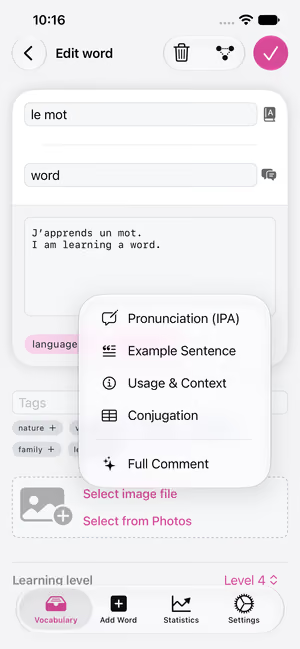
In Wokabulary 8.2, AI can help you write comments for your words. The new AI comment tools can add an example sentence, create a pronunciation transcription, give context and usage notes, and create conjugation tables.
AI Comment Tool
If you’re learning one of the supported language combinations and have Siri AI turned on, you’ll now see a small AI button in the comment field. The AI can write an example sentence for the word, generate its exact pronunciation in phonetic transcription, give usage notes, or create a conjugation table (for verbs).
Of course, you can still write your comments yourself, but the AI might often save you time and typing.
Supported languages currently include all Western European languages as well as Chinese, Korean, Japanese, Vietnamese and Turkish.
Better AI Translations
We’ve also improved machine translation. Where available, we now use Apple Intelligence here as well, with a prompt made specifically for single-word translations. This means you’ll usually get the translation as you’d find it in a dictionary: in its base form and with its article (depending on the language).
Since Apple currently supports only the most widely spoken languages, we’ve also expanded automatic translation for other languages. For over 100 languages, Wokabulary now uses DeepL for translations. And in case you are offline (or Siri AI isn’t available to you yet), we still use Apple’s on-device translation.
Availability
The new AI features use Siri AI and Apple Private Cloud Compute. Both are currently only available on newer devices (iPhone 15 Pro or newer and Macs with Apple silicon), and only if your system and Siri are set to English.
Note: In the EU, Siri AI is currently only available on macOS. In Mainland China, it is not available at all, yet.
For the latest details, see our support article Why don’t I see the AI comment tool?
Hard Words
Besides the AI features, Wokabulary 8.2 also improves the filter for hard words.
In the detail sidebar, you now see each word’s difficulty score and can reset also it.
The difficulty level is calculated separately from the learning levels. The algorithm is designed so that words you keep getting wrong get a higher value. This lets you use the Hard Words view to specifically review the words you keep forgetting or mixing up.
Wokabulary 8.2 is available now as a regular (free!) update on the App Store.